

tl;dr: You need 3 fields to solve the source attribution problem: Source 1 (Dropdown), Source 2 (Dependant dropdown on Source 1), Source 3 (open text field) and automate these as much as possible. Click here to download the template.
Table of contents:
- What’s the problem
- Why you need a solution
- What’s behind it
- What the solution is
- Don’t stop at contacts
- The template
What’s the problem
HubSpot’s traffic source properties are extremely useful — especially if most of your leads come through digital channels. In an ideal, online-only setup, they give you a solid understanding of where people came from and how they interacted with your content. But very few companies operate in that kind of clean environment for long.
As soon as you start bringing in offline sources — events, referrals, partner introductions, cold outreach, even manually created contacts — the standard source fields stop telling the full story. And even with purely digital leads, not every campaign fits neatly into the default logic. Different teams have different reporting needs, and sometimes you simply want more context than the built-in structure provides.
That doesn’t mean the existing properties are wrong or useless. Quite the opposite. The data HubSpot captures in its traffic source fields is incredibly valuable, and I would strongly recommend not modifying or replacing them. They’re consistent, system-managed, and extremely helpful when you need to understand how HubSpot itself interprets attribution.
Instead, the goal is to build something on top of them — a structure that keeps the original data intact while giving you the flexibility to reflect how your business actually generates leads.
Why you need a solution
If attribution only worked for online leads, and only for the “clean” scenarios, then it wouldn’t be that important. But source data quickly becomes one of the most used dimensions in reporting. It influences how you allocate budget, which channels you scale, how you evaluate events and partnerships, and how confident leadership feels in marketing’s numbers.
And once your CRM becomes the place where everyone looks for answers, “we don’t really know where these came from” stops being acceptable. So the real need isn’t more tracking. It’s a model that holds up when:
- leads enter through multiple paths (digital + offline),
- different teams want different views,
- and human behavior inevitably introduces noise.
What are the things behind it?
Before we jump into the solution, it helps to name what’s actually happening behind the scenes — because most attribution problems aren’t “technical issues,” they’re system-design issues.
1) HubSpot traffic source is a system view, not your business view
HubSpot’s source properties tell you how HubSpot interprets traffic and conversions. That’s valuable, but it’s not always the same thing as how your business wants to categorize acquisition.
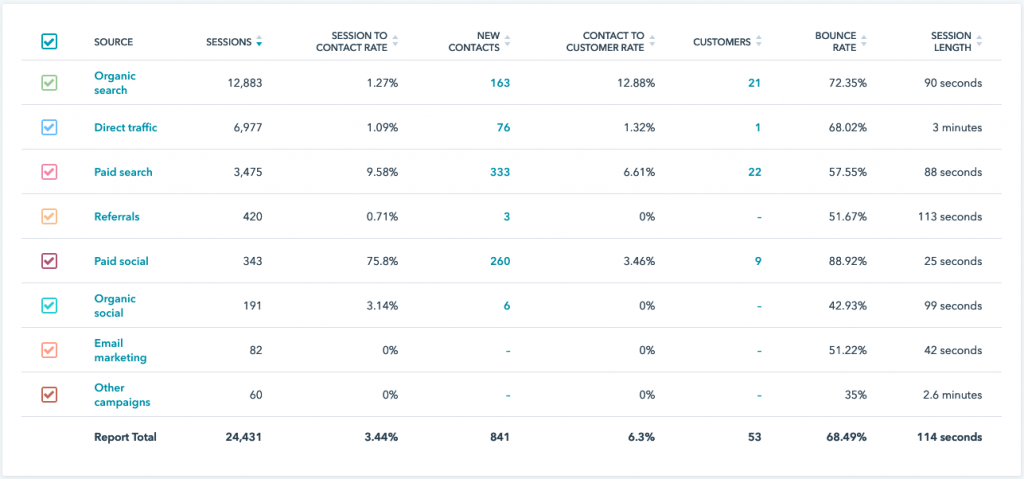
2) Attribution is rarely broken because of tracking alone
It’s usually broken because your process is more complex than the default model:
- offline → no tracking
- imports → missing context
- manual creation → inconsistent inputs
- partner/referral flows → don’t behave like campaigns
- different reporting needs → one model can’t satisfy all stakeholders
3) You need something stable for reporting, and something flexible for reality
If everything is “flexible,” reporting becomes useless. If everything is “strict,” people stop using it (or they create workarounds that are worse). That tension is exactly why the layered approach works.
What the solution is
Building on top of HubSpot’s model, not replacing it
This is where the three-level attribution structure comes in. Think of it less as a new system and more as an extension of logic that already exists. It gives you room to customize without losing the standardization HubSpot provides.
In most setups I’ve worked on, the first two levels stayed relatively stable across industries:
- Source 1: a top-level channel view that supports high-level reporting
- Source 2: a structured detail level that depends on the channel
Where things usually vary is the third layer. Some teams keep it as a single open text field, while others split it into multiple properties like campaign name, event name, webinar title, or “referred by.” The exact structure depends on how granular you want to be and how your organization works.
The key idea is flexibility without chaos. You keep HubSpot’s native properties untouched, and your custom fields give you the freedom to represent reality more accurately.
Automating what you can (and why workflows matter here)
Once the fields exist, the next step is automation. You don’t want your team manually filling these fields for every digital lead — that’s where mistakes creep in. Instead, create a workflow that uses HubSpot’s original traffic source properties as the starting point and automatically assigns values to your new Source 1 and Source 2 fields whenever possible.
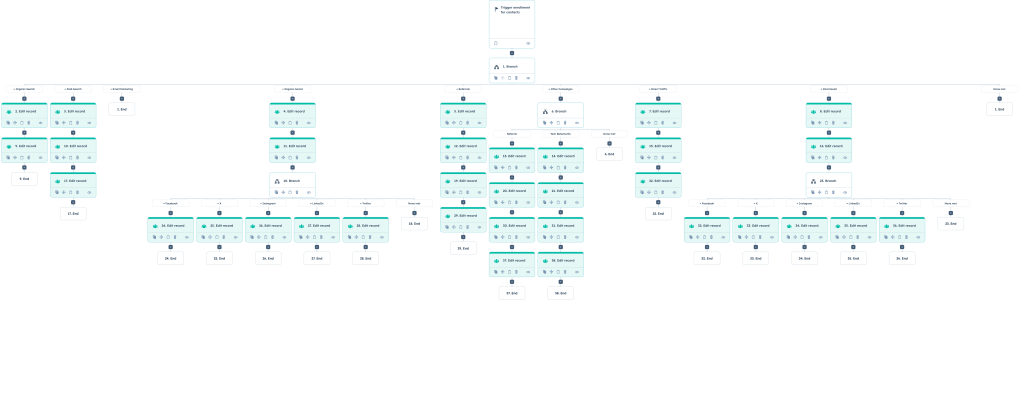
HubSpot’s documentation on how traffic source properties work is genuinely worth understanding before you build this logic (and you should link it in your article):
https://knowledge.hubspot.com/properties/understand-traffic-source-properties
The goal isn’t to duplicate HubSpot’s system blindly, but to translate it into a structure that fits your reporting model.
For example, if HubSpot categorizes a contact as Paid Social, your workflow could automatically set Source 1 to Paid Social and Source 2 to LinkedIn or Meta based on drill-down values. That way, digital leads arrive already categorized, and your team only needs to intervene when something falls outside the usual patterns.
First source vs. last source (and why you should probably keep both)
One thing that’s important to clarify early is what you actually want to measure: the first source or the last source. In this article, the focus is on first-touch attribution — meaning once the source fields are populated, they don’t change. This gives you a stable understanding of how leads originally entered your ecosystem.
That said, it’s entirely possible to design the system around last-touch attribution instead. In that case, the fields would update whenever a new interaction changes the source.
Personally, I’ve found it safest to mirror HubSpot’s own model and maintain both perspectives. Keeping a fixed “first source” alongside a dynamic “last source” gives you flexibility later. You might start by reporting on acquisition channels, and six months down the line decide to analyze conversion triggers instead. If both data points exist, you don’t need to rebuild anything — you simply change how you look at the data.
The final step: reporting with your own attribution model
Once the structure and automation are in place, reporting is where everything starts to come together. And this is usually the moment where teams need to make a mindset shift.
With this model, you’re not relying solely on HubSpot’s built-in source attribution fields for reporting anymore. Instead, you’re using your new Source 1, Source 2, and Source 3 fields as the primary way to understand where records are coming from.
There are pros and cons to that approach:
HubSpot’s native fields are still extremely valuable, and I wouldn’t recommend ignoring them entirely. They provide a standardized system view that can be useful when troubleshooting tracking or comparing performance from a technical perspective. But the goal of this structure is slightly different — it focuses on attribution from the perspective of your business reality, not just how a tracking system classifies traffic. That distinction becomes especially important once you start working with offline leads, referrals, partner introductions, or complex sales cycles.
Don’t stop at contacts: build this across your CRM objects (and why it matters in B2B)
One of the most important decisions in any attribution model isn’t just what fields you create — it’s where those fields live. In most setups, I recommend creating the same 3-layer source structure across:
- Contacts
- Companies
- Deals (with some variation)
The reason is simple: each object tells a different part of the story. If you only track source on contacts, you’ll get a very marketing-heavy view of acquisition. Useful — but incomplete. If you only track source on deals, you’ll get a revenue view — also useful, but you’ll lose visibility into how your audience and accounts are actually entering the business.
For simplicity, it helps when the logic stays consistent across objects. Using the same naming conventions and similar dropdown options reduces confusion, improves adoption, and makes reporting easier to maintain long-term.
That said, the deal level is usually where customization makes the most sense. Deal attribution often reflects revenue events rather than pure acquisition. Upsells, renewals, expansions — these aren’t “new leads,” and forcing them into the exact same acquisition structure can make your reporting less accurate. So it’s completely reasonable to keep the same overall logic but use slightly simpler or slightly different options at the deal level.
Why each object matters (especially in B2B)
If you’re working in a B2B environment, separating attribution across contacts, companies, and deals gives you a much more realistic picture of what’s actually happening.
Company source tells you how your actual clients came into your ecosystem. This is often the view leadership and sales teams care about most, because it reflects how accounts — not just individuals — are acquired. It also prevents the classic “lots of leads, few real accounts” confusion.
Contact source gives marketing teams insight into where the people they engage with originate from. This is useful for understanding campaign performance, audience growth, list building, and how different channels contribute to top-of-funnel activity — even when those contacts don’t immediately become customers.
Deal source connects attribution directly to revenue. It helps answer the question everyone eventually asks: which efforts are actually influencing pipeline and ROI? And it’s also where you can separate “new business” from “expansion/renewal” in a way that makes your reporting far more honest.
Each layer adds context, and none of them replace the others. Together, they give you a clearer understanding of how leads turn into relationships, relationships turn into accounts, and accounts turn into revenue.
The Template
A practical example: how Source 1 and Source 2 can be structured
To make this more concrete, I’ve included a template that shows how Source 2 values can map back to Source 1. This isn’t meant to be a universal framework. Every company will have slightly different naming conventions and internal workflows. The goal here is simply to show what a structured, real-world setup can look like once you move beyond default attribution.
In this example, Source 1 represents the main acquisition channel — the level that stays relatively stable over time and is most useful for reporting.
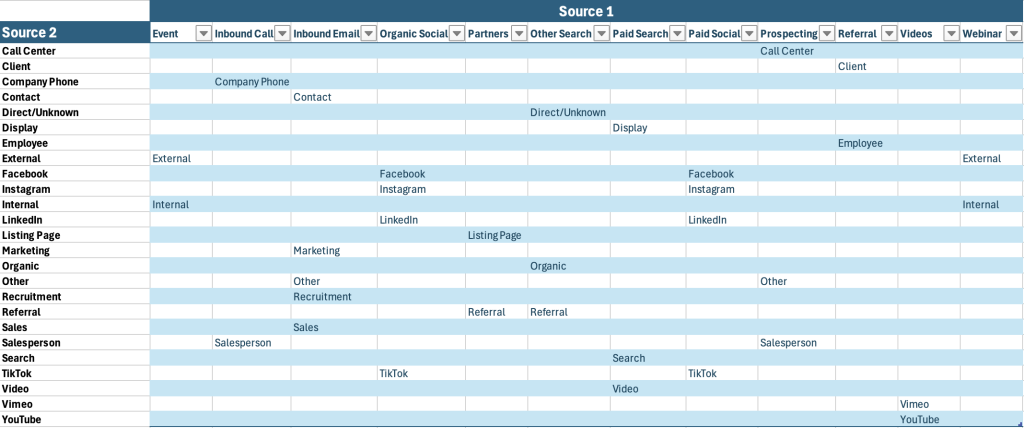
Download as an excel file here.
Source 2 then adds detail within each of those channels. Instead of letting people type whatever they want, predefined options help keep the data consistent while still allowing flexibility.
You’ll notice that some of these options overlap conceptually. That’s normal. Real organizations don’t operate in perfectly separated channels, and this structure reflects that reality while still keeping reporting manageable at the Source 1 level.
How to use the template (without overcomplicating it)
The easiest way to think about this is:
- Source 1 answers: Which channel brought this into our ecosystem?
- Source 2 answers: What specifically happened within that channel?
So “Paid Social → LinkedIn” or “Event → External” becomes easy to understand and easy to report on.
This structure also helps guide users when they’re creating or importing records. Instead of typing whatever comes to mind, they’re choosing from a controlled set of options that already align with how the business reports on performance.
And if your organization evolves, you don’t need to rebuild the whole model — you simply adjust Source 2 values while keeping Source 1 stable.
A quick note before you copy this exactly
This template reflects one working example across multiple companies and industries, but it shouldn’t be treated as a fixed framework. In my experience:
- Source 1 rarely changes much once it’s set up properly.
- Source 2 evolves over time as new channels, campaigns, or internal processes emerge.
- The real flexibility usually lives in Source 3, where campaign names, event details, or referrals can vary without breaking reporting.
So use this as a starting point, not a rulebook.
A note on “Other” — and why it matters more than people think
One option that usually needs a bit of explanation is “Other” in Source 2.
There’s no such thing as an ideal attribution setup. New scenarios appear all the time — a one-off partnership, a new campaign format, a strange inbound route that didn’t exist when the system was designed. Because of that, having an “Other” option at the detailed level can be useful as a temporary placeholder.
But there’s an important distinction here: In this structure, “Other” exists in Source 2, not Source 1.
Source 1 should represent a clear understanding of how leads enter your ecosystem at a high level. Even if the details aren’t perfect yet, you should generally have some idea whether something came from an event, a partner, prospecting, or a digital channel. Allowing “Other” at the top level often creates more confusion than flexibility, because it removes the pressure to categorize leads meaningfully.
That said, this becomes an operational decision rather than a technical one.
Some organizations choose to avoid “Other” in Source 1 entirely and instead force users to pick the closest matching channel. When a new pattern emerges, the admin reviews it and updates the model accordingly. This approach keeps reporting cleaner but requires more proactive maintenance.
Others include “Other” as a final fallback option in Source 1 — but only with additional required information, usually through Source 3 or a related field. This can be helpful if your business frequently experiments with new channels or operates in less structured environments.
The trade-off is predictable: if “Other” exists, people will use it. Sometimes because they’re unsure, sometimes because it’s faster than searching for the correct option. That’s why this choice is less about system design and more about team behavior.
Do you want to push users toward precision and handle the edge cases yourself as an admin?
Or do you want to allow flexibility and then review “Other” entries periodically to refine your structure and guide future training?
Neither approach is universally right. What matters is being intentional about it — and monitoring usage regularly so “Other” doesn’t quietly become your biggest source.
At the end of the day, this isn’t really a technical decision — it’s an operational one. Attribution models don’t usually fail because of tools or missing features. They drift over time because of behavior. People choose the quickest option, new scenarios appear, and structures that once made sense slowly lose clarity if they aren’t reviewed.
That’s why it’s worth revisiting these fields regularly. If “Other” starts appearing too often, it’s usually a sign that either your structure needs to evolve or your team needs clearer guidance. The goal isn’t to eliminate flexibility, but to make sure flexibility doesn’t quietly turn into uncertainty in your reporting.